A Tale of Two Systems: A Primer on Software Architecture (Part 3)

In the last post, we covered common design problems that you may encounter while working on software systems. We discussed common traps that seem like good solutions to those problems, as well as the correct methods for addressing the problems. In this part, we will explore how to apply the software design process to a brand new system.
Thinking Through a Greenfield System
With software architecture ideals and common failure modes in the background, I want to share some practical advice for putting your best foot forward when working on a greenfield system, a program that is brand new and has no existing code. It’s an exciting time that most developers enjoy. There is no existing code to weigh you down. Every decision is open to you. However, it’s also easy to make the wrong ones.
A common mistake, especially for beginners, is to immediately jump to libraries, tools, and database technologies. The trap is that these are already implementation details. Whatever their benefits, the designers of these technologies have already made concrete implementation decisions and accepted tradeoffs. If you think about them too early, you risk closing off more optimal architectural paths to yourself. You should first think about the system in terms of behavior and component separation before deciding if a specific component can be handled by a library. For example, you should try to keep the concept of “database” abstract during the first planning phases and not commit to any specific database provider. That said, “don’t reinvent the wheel” is also a good mantra, and you shouldn’t build things from scratch if a workable library implementation already exists.
When breaking the system into components, start with the problem domain concepts and relationships. That is, imagine and develop your system around what real ‘tasks’ the system should do. If a person were to do this task manually, what information would they need? What processes would they follow? For example, in an e-commerce solution, they would need to keep track of a list of available products, have a procedure for taking payment information and processing it, be able to notify the warehouse that an order needs to be prepared, etc. This step often requires collaboration with an expert in the problem domain. For example, in the case of an e-commerce solution, you may need to talk to customers or your warehouse or sales manager to find out what the system needs to do. Once you understand those concepts, you can start thinking about how to represent them in data types and software components. Ideally, the software architecture reflects the problem domain. A developer familiar with the software from a user perspective should be able to intuitively understand the components under the hood.
Next, you need to identify the boundaries between different components and layers. Remember Parnas’s principle: the things that are most likely to change need to be hidden most. External dependencies, UI layouts, third party APIs, etc. are all very likely to change, so they shouldn’t be widely relied upon in the system. Similarly, we need to think about what aspects of the domain are most likely to change. Extending our e-commerce example: Hardcoding that we only sell five different products would be a very bad idea, because shops add new products all the time. However, the assumption that customers need to put in payment information before they are allowed to complete their order is unlikely to change. Anytime you design an interface between two components, you should always ask “What’s the likelihood that this will change, and how painful would it be?” Remember, in general, “how” something happens should be more concealed than the “what”.
Once you have some conception of the components formed, you should start diagramming them. This doesn’t have to be in strict, standard-compliant UML. You can put it on a whiteboard or a digital sketching tool and use whatever visual structure suits you.[1] The point is to have an easy-to-digest summary of the architecture for colleagues or stakeholders to review. It makes it much easier to spot obvious problems or gaps. It is very inexpensive to modify if you change your mind. Once you have the diagram relatively stable, you can implement a “walking skeleton”. Make a mock component structure and test the flow. In the e-commerce example, this might be an API endpoint that walks through any business logic and returns a hard-coded product. The point is to validate the relationship structures, not the fine behavior.
Finally, you can validate the architecture by building the complete flow for one feature. This is called a thin vertical slice. Ideally, choose a feature that hits many different subsystems, such as adding an item to cart in the e-commerce example. This will teach you about the information hiding and design decisions in the components you touch. For example, you might discover that the two components know way too much information about each other’s implementation. This lets you catch architectural problems before they become entrenched. Once you’ve validated the structure, you can continue to add on more features, and the system will grow naturally from that point.
Practical Example
Imagine that you have been assigned to build a library computer system to manage book checkouts and returns. The library wants a new system, and there’s no required interaction with any existing systems. Remember, at this stage, you don’t want to jump to React interfaces and MongoDB storage. First, you need to understand the requirements. Here are a few basics we’ll use to walk through the example:
Members of the library can get loans of copies of books. If a book is brought back late, a fine is assessed.
First, work with a domain expert to make sure you have the right understanding of what the system will do. For example, you might initially model a book as a single item that gets checked out. But when you talk to the librarian, she tells you the library regularly stocks multiple copies of the same title, and that tracking which physical copy is on which shelf matters. Suddenly you need two distinct concepts: a Book (the title, author, and metadata) and a Copy (a specific physical instance of that book). This kind of correction from a domain expert is normal and valuable; it's much cheaper to discover at this stage than after you've built a data model around the wrong assumption. When talking to the expert, notice the nouns and verbs that are used. These often translate into domain entities and actions that your software needs to be able to handle. For example, the system will need a virtual representation of “book” and the “checkout” process.
Next, working with the domain expert and your own experience of software systems, apply Parnas’s principle. What items are most likely to change? In our case, some domain items that are likely to change include the duration of loans, the fine amount calculation, rules about who can check out what, etc. Some technical items that are always likely to change are database format, UI layouts, etc. This gives us ideas about how to draw our component boundaries to effectively hide those pieces of information.
Let’s imagine a set of components that will manage this logic.
- Catalogue Service: owns Book and Copy records, tracks availability
- Member Service: manages member accounts and authentication
- Loan Service: manages the lifecycle of a loan — checkout, renewal, return
- Reservation Service: manages the hold queue for unavailable books
- Fine Service: calculates and tracks fines, applies payments
- Notification Service: handles outbound communications — due date reminders, hold alerts
- Web interface: presents all the information to users and allows them to make changes.
- Database: stores all the data.
There’s no definitively correct structure for this system. Will enough "fine” behavior change to warrant the loan service and the fine service being separate components? We don’t know up front. Often, you must make your best guess at the structure based on the requirements and refine it later. This is a normal part of the process. If the loan service starts to know too much about fines, we may have drawn the component boundary in the wrong place.
Next, draw a quick diagram showing how you believe the components will interact. For example, for the components we just described:
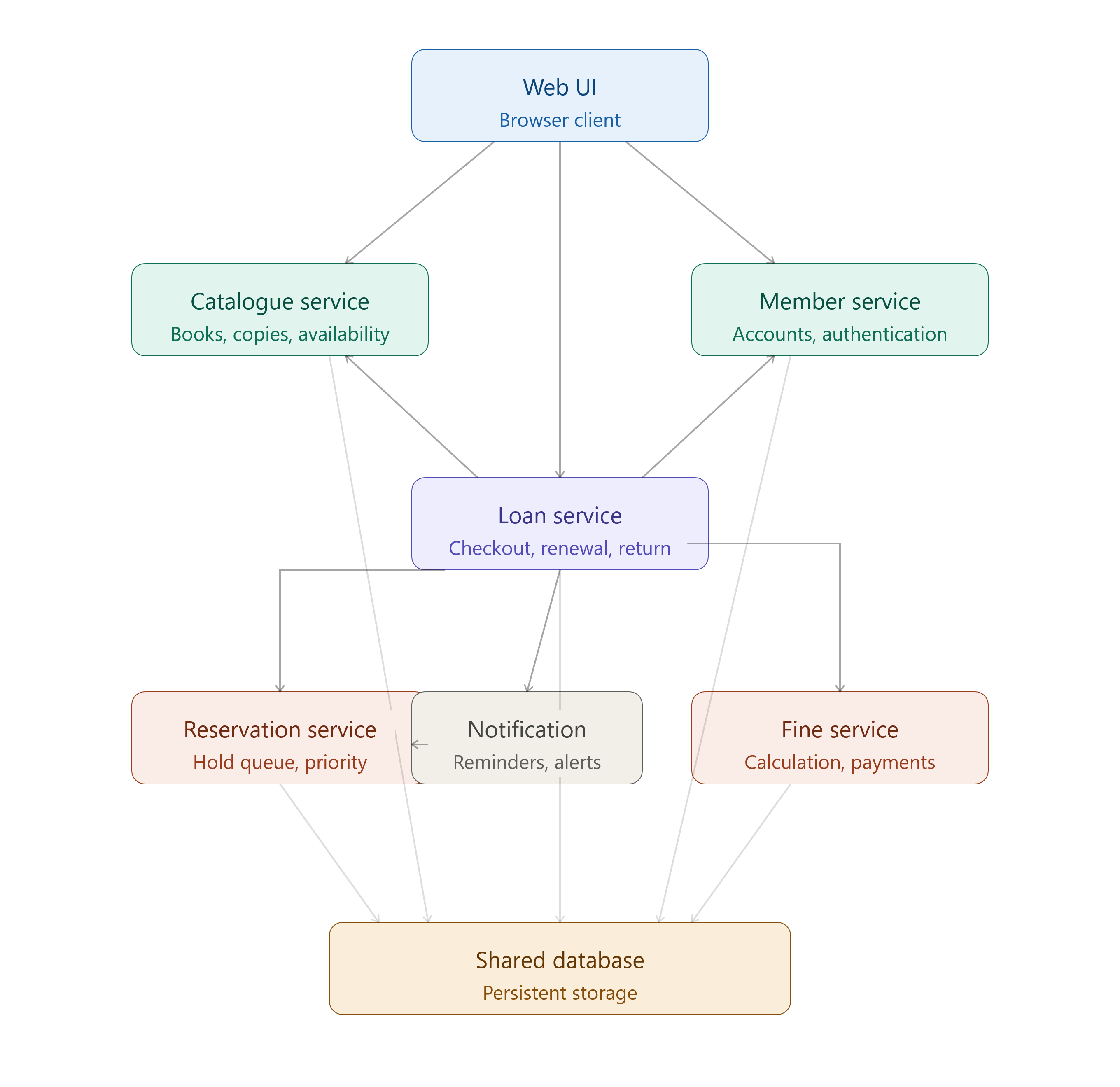
The purpose of the diagram is to get you thinking about which parts should and shouldn’t interact. For example, the notification system might need to look up a user’s email address with the member service, but the catalogue and fine services have no real reason to know about each other. We also notice that the loan service touches almost everything. That’s a signal that we might consider breaking it down into multiple pieces if its job is too complex. Don’t be afraid to change the diagram later. The diagram is a hypothesis about the optimal architectural structure, not a prison.
After reviewing these high-level relationships, you are ready to do the walking skeleton. This might be as simple as a webpage that works through creating an account and checking out a book with hardcoded data. The purpose of this is to exercise the connection structure and watch for any awkward data transformations or connections we didn’t notice in the planning stage. This is also the right stage to try to define your component interfaces. For example, what does the loan service need to ask the catalog service, and what answer does it get back? This is also when it makes sense to start thinking about frameworks. Now that you know the shape of your data and the nature of your component interactions, you can make an informed choice about whether a relational or document database better fits your needs, for example.
Finally, you’re ready to build your thin vertical slice. For the library system, it’s probably fleshing out the internals of the components enough to walk through a realistic checkout process. Checking if the book is available, registering a loan on the user’s account, etc. Watch for any tight coupling between systems, any information hiding constraints that don’t work how you thought they would, or other problems. If you struggle to express something in code without breaking your component interfaces, that might be a problem with your architectural design. Additionally, you’ll have to design the component’s internals. This is a repeat of the whole process in miniature, as the internal components will have interfaces and responsibilities too. Once that feature works end-to-end, you have validated the architecture and can have more confidence in adding new features.
In the final part, we will explore how to apply the architectural design process to existing legacy systems.
If a more formal structure is helpful to you, I recommend Simon Brown’s “C4” model. ↩︎